Explore molecular possibilities.
Bring a molecule or an idea. Understand its properties, then explore what comes next.
01 Your starting point
One molecule at a timeExample names work locally. Free-form descriptions use the optional assistant.
Click to place an atom. Select an atom, then click empty space to extend or another atom to connect. Click a selected atom to change its element. This editor uses implicit hydrogens; use MOL import for charge or stereochemistry.
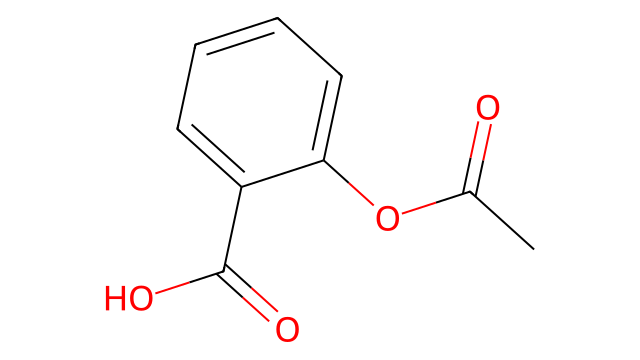
Example aspirin diagram selected. Upload another image to replace it.
Image interpretation uses OpenAI. Review the proposed structure before analysis.
Local chemistry stays on this machine. Enabling the assistant sends the request and molecular data to OpenAI.
A molecule has a story.
Start with a structure to see its chemistry,
predicted properties, and possible next directions.
Ready to explore alternatives?
Choose solubility, lipophilicity, molecular weight, or other targets in the Generate tab.
Generate molecular possibilities.
Start with a molecule and choose the properties you want to explore.
01 Starting molecule
SEED-BASED DESIGNUse a seed for molecular editing. The reviewed plan will show numbered atoms. Leave it empty only for assistant-guided whole-structure proposals.
Choose an edit
These controls define the offline plan. Enable the assistant above to interpret a written request instead.
Only groups connected through a single boundary bond can be removed or replaced.
Additional structure requirements
Enabling Assistant proposals sends your seed, request, and targets to OpenAI.
02 Desired properties
Select one or moreSelected properties guide ranking equally. All-target matches appear first; closest alternatives follow. The combined score is a ranking aid, not a probability.
−2 logS corresponds to 0.01 mol/L. This is a prediction target, not a solubility guarantee.
Review the interpretation before generating. Required structural checks come before property ranking. Unsupported requirements are shown as unverified.
Confirm only if the interpretation matches your intended changes.
Explore protein and ligand fit.
Predict a protein structure or explore how a small molecule may interact with it.
Your protein and molecule
Default: ABL kinase domain + imatinib, a known inhibitor pair from PDB 1IEP ↗. This is the deposited mouse ABL kinase-domain construct. You can replace it with your own sequence or single-record FASTA.
The default example loads a saved 3D prediction immediately. Replace the inputs and choose Predict protein–ligand fit to calculate your own result. This prediction may differ from the experimentally measured structure. Clear the ligand for a protein-only prediction.
Preview the protein and ligand separately before prediction. A protein sequence needs a matching prediction or an uploaded structure; ligand shape is generated from SMILES.
Using related sequences can improve accuracy. Choose this only if you may share your protein sequence with the external alignment service.
Selecting a saved prediction loads its protein and ligand into Your protein and molecule.
Prediction availability
Checking installation…
Predictions run in the background. You can continue using the app while you wait. Larger proteins and additional samples take longer.
What you can learn
Preview your input protein and ligand separately in 3D, download predicted structures, and review model confidence. With a protein and ligand, request a predicted binder probability and an affinity estimate.
Binder probability is a model score for distinguishing binders from decoys. The affinity value is log₁₀(IC₅₀ in µM); lower values indicate stronger predicted binding and are intended for comparing active molecules.
This workspace supports one protein and an optional small molecule. It does not predict PCR assay performance or oligonucleotide binding affinity.
About the prediction method ↗Input structures · before binding prediction
Separate views show each input on its own. Their orientations do not represent a binding pose.
Input protein
Uploaded files are displayed locally as provided; sequence identity is not verified and the file is used for viewing only.
Input ligand
Drag to rotate; scroll or pinch to zoom.
Design a PCR assay.
Find primer pairs and an optional detection probe for your DNA target.
Your target
Use a DNA target or intended cDNA. One sequence, A/C/G/T only. The example is synthetic and has no biological annotation.
Match your reaction conditions
These example conditions affect the estimates. Replace them with your reagent conditions. Concentration is a modeling input, not a recommended assay recipe.
The same concentration assumption is used for all oligos. Working temperature controls folding ΔG estimates and review flags; it is not an optimized cycling temperature. Search targets primers near 60 °C and an unmodified probe near 68 °C.
Sequence calculations run on this server without the language assistant or an external sequence upload.
What assay developers design
Primers define the region to amplify. A detection probe adds sequence-specific fluorescence readout in probe-based qPCR.
Control templates and internal-control oligos help check the workflow. Specialized assays may also need allele-specific primers, blocking oligos, molecular beacons, or modified probes.
Supported here
Design unmodified DNA primer pairs and a linear hydrolysis-probe sequence. Review melting, folding and pairwise dimer estimates, then export candidates.
Reporter and quencher chemistry, modified bases, control-template design, multiplex panels and allele discrimination need dedicated design tools and are not generated here.
Before ordering
Check specificity against the intended organism and review the probe labels and extension block with your supplier. These candidates have not been tested as an assay.
Open NCBI Primer-BLAST ↗Research behind this workspace
- Primer3 paper · sequence design and folding checks
- MIQE 2.0 · controls and assay validation
- 5′ nuclease detection patent
- Dual-conformation probe patent
- MGB–oligonucleotide patent
Patents illustrate design approaches. Patent scope and freedom to operate have not been assessed.
Model library.
Understand what each model helps you explore and how it learns about molecules.
How the models learn
Each model learns from examples of molecules with known properties. It looks at the atoms, the bonds between them, and the patterns they form. During learning, it connects those structural patterns with the property it is meant to predict.
The models are checked using molecules kept apart from their learning examples. This helps assess how well they handle unfamiliar structures. Predictions are most useful as a starting point for comparison and further investigation.
Protein and ligand fit
This tool learns from examples of molecular structures and interactions. It estimates how a protein and molecule may fit together. Use the 3D views to inspect their predicted shapes and position, then validate promising results in the laboratory.
PCR sequence design
The PCR workspace uses established sequence and hybridization rules to choose primers and probes. It evaluates how oligos bind and fold, rather than learning from small-molecule examples. No model training is required for this workflow.
Different tools for different questions
Property models estimate characteristics such as solubility or lipophilicity. The optional language assistant helps interpret your question and explain the results. Together, they help you explore a molecule from both its structure and your research goal.
From a molecule to an idea.
Analyze a structure, explore alternatives, and save the results you want to investigate.
Start with a molecule
Open Explore molecules and choose the input that suits you. Paste a SMILES string, enter a familiar molecule name in Text, draw a structure, import a MOL file, or upload a molecular diagram. Ready-to-use examples are included so you can try the app right away.
Review your structure
For text or image input, choose Find structure or Read structure, review the proposed drawing, and confirm the molecule you want to use. Check the atoms and bonds carefully, especially when working from an image.
Ask and analyze
Add a question in What would you like to explore?, then choose Analyze molecule. Review the molecular drawing, calculated properties, and available predictions. If the optional assistant is available, enable it for an explanation tailored to your question. Free-form descriptions and image interpretation also use the assistant.
Generate alternatives
Open Generate molecules, or choose Generate from this molecule after entering a structure in the explorer. Keep the example seed or replace it with your own molecule, then describe what you want to explore with the assistant or choose an offline edit.
Select your desired properties, such as water solubility, lower lipophilicity, molecular weight, or drug-likeness. Adjust the targets and choose Review design plan. Answer any clarification questions, review the numbered structure and intended edits, then choose Confirm plan & generate. Candidates meeting all selected targets appear first. Turn on Only show candidates meeting every target if you want to hide alternatives that fall short.
Each candidate shows which targets it meets. If no candidates match, relax a target or turn off the all-target filter. Choose Explore this molecule to bring a candidate back to the explorer for analysis.
Predict a protein complex
Open Protein & ligand fit, enter a protein sequence and optionally a ligand SMILES. Choose whether to use external sequence alignment, review the input, and run a background prediction. Review confidence and download the structure when it finishes.
Design PCR oligos
Open PCR assay design, paste your DNA or cDNA template, and choose a primer pair with or without a hydrolysis probe. Match the reaction assumptions to your reagents, design candidates, and review their sequences and checks. Export a candidate list, then use Primer-BLAST and laboratory testing to assess specificity and performance.
Save your work
Use Export results to save an analysis, Download MOL to save a structure, or Export candidates JSON to save generated candidates and their results.
Use results as a starting point
Predictions and generated molecules support research exploration. Review them before making decisions, and validate promising candidates independently. Meeting a property target does not establish that a molecule is safe, effective, or practical to make.